Showing posts with label roguelike tutorial. Show all posts

Wednesday, May 23, 2012

Marte Engine Graphic Rogue Like Tutorial 11

0 commenti
Hunger and food 

Welcome reader to this tutorial! I'll show you how to build a roguelike with MarteEngine. For more information about MarteEngine, please see http://github.com/Gornova/MarteEngine. This tutorial is inspired from same serie from Trystan and follow the same organization, so let's start!
 In this tutorial we'll add food and hunger mechanics to our rougelike! This tutorial is different from other parts. In particular follow on all points Trystan's tutorial, so let's start!

package merlTut;

import it.marteEngine.ResourceManager;
import it.marteEngine.entity.Entity;

public class Item extends GameEntity {

 private static final int tileSize = 8;
 private static final int scaleFactor = 4;

 public static final String ITEM = "item";
 public static final String POTION_RED = "red Potion";
 public static final String GOLD_KEY = "gold Key";
 public static final String STEEL_SWORD = "steel sword";
 public static final String FOOD = "food";

 private int foodValue;

 public Item(float x, float y, String type, boolean collidable, int sheetx,
   int sheety) {
  super(x * tileSize * scaleFactor, y * tileSize * scaleFactor);

  setGraphic(ResourceManager.getSpriteSheet("obj")
    .getSubImage(sheetx, sheety).getScaledCopy(scaleFactor));

  name = type;
  addType(type, ITEM);
  if (collidable) {
   setHitBox(0, 0, tileSize * scaleFactor, tileSize * scaleFactor);
  } else {
   collidable = false;
  }
 }

 @Override
 public void collisionResponse(Entity other) {
  if (other instanceof Hero) {
   Hero hero = (Hero) other;
   hero.pickup(this);
  }
 }

 public void use(Creature creature) {
  if (creature instanceof Hero) {
   if (isType(POTION_RED)) {
    creature.modifyHp(10);
    creature.notify("'%s' use '%s' + %s Hp", creature.name, name,
      "10");
    world.remove(this);
    creature.inventory().remove(this);
   }
   if (isType(STEEL_SWORD)) {
    creature.modifyAttackValue(5);
    creature.notify("'%s' equip a '%s' + %s atk", creature.name,
      name, "5");
    world.remove(this);
    creature.inventory().remove(this);
   }
   if (isType(FOOD)) {
    creature.eat(this);
    creature.notify("'%s' eat '%s' +%s food", creature.name, name, foodValue());
   }   
  }
 }

 public int foodValue() {
  return foodValue;
 }

 public void modifyFoodValue(int amount) {
  foodValue += amount;
 }

}

We have add food value and FOOD type to Items, so cretures can interact with it.. eating it! So modify Creature class:

package merlTut;

import it.marteEngine.entity.Entity;

public abstract class Creature extends GameEntity {

 public static final int scaleFactor = 4;
 public static final int tileSize = 8;
 public static final int step = tileSize * scaleFactor;

 private int attackValue;

 private CreatureAi creatureAi;

 private int defenseValue;

 public final String FUNGUS = "fungus";
 public final String BAT = "bat";
 private int hp;

 private int maxHp;
 public boolean moved = false;

 private int visionRadius;

 private Inventory inventory;

 private int maxFood;
 private int food;

 public Creature(float x, float y, int maxHp, int attack, int defense,
   int visionRadius) {
  super(x, y);
  this.hp = maxHp;
  this.maxHp = maxHp;
  this.attackValue = attack;
  this.defenseValue = defense;
  this.visionRadius = visionRadius;
  this.inventory = new Inventory(20);
  this.maxFood = 100;
  this.food = maxFood;  
 }

 public void attack(Creature other) {
  int amount = Math.max(0, attackValue() - other.defenseValue());

  amount = (int) (Math.random() * amount) + 1;

  other.modifyHp(-amount);

  notify(name + " attack the '%s' for %d damage.", other.name, amount);
  other.notify("The '%s' attacks you for %d damage.", name, amount);
 }

 public int attackValue() {
  return attackValue;
 }

 public boolean canSee(Entity creature) {
  return creatureAi.canSee((int) creature.x, (int) creature.y);
 }

 @Override
 public void collisionResponse(Entity other) {
  creatureAi.collide(other);
 }

 public int defenseValue() {
  return defenseValue;
 }

 public int hp() {
  return hp;
 }

 public int maxHp() {
  return maxHp;
 }

 public void modifyHp(int amount) {
  hp += amount;

  if (hp > maxHp) {
   hp = maxHp;
  }
  if (hp < 1) {
   leaveCorpse();
   world.remove(this);
  }
 }

 public void move(int dx, int dy) {
  float cx = x + dx * step;
  float cy = y + dy * step;
  if (cx >= 0 && cx < world.width && cy >= 0 && cy < world.height) {
   if (collide(new String[] { Tile.WALL, FUNGUS, Tile.STAIRS_UP,
     Tile.STAIRS_DOWN, BAT, Item.ITEM }, cx, cy) == null) {
    x = cx;
    y = cy;
   }
  }
 }

 public void notify(String message, Object... params) {
  creatureAi.onNotify(String.format(message, params));
 }

 public Tile tile(int wx, int wy) {
  return ((GameWorld) world).tile(wx, wy);
 }

 public void setCreatureAi(CreatureAi ai) {
  this.creatureAi = ai;
 }

 public void updateAi() {
     modifyFood(-1);  
  creatureAi.update();
 }

 public int visionRadius() {
  return visionRadius;
 }

 public Inventory inventory() {
  return inventory;
 }

 public void pickup(Item item) {
  if (inventory.isFull() || item == null) {
   notify("inventory full for '%s'", name);
  } else {
   notify("pickup a '%s'", item.name);
   world.remove(item);
   inventory.add(item);
  }
 }

 public void drop(Item item) {
  if (item != null) {
   notify("drop at the ground a '%s'", item.name);
   inventory.remove(item);
   item.x = x;
   item.y = y;
   world.add(item);
  }
 }

 public void modifyAttackValue(int amount) {
  attackValue += amount;
 }

 private void leaveCorpse() {
  Item corpse = new Item(x / (tileSize * scaleFactor), y
    / (tileSize * scaleFactor), Item.FOOD, true, 13, 1);
  corpse.modifyFoodValue(maxHp * 3);
  world.add(corpse);
 }

 public int food() {
  return food;
 }

 public int maxFood() {
  return maxFood;
 }
 
 public void modifyFood(int amount) {
     food += amount;
     if (food > maxFood) {
         food = maxFood;
     } else if (food < 1 && isPlayer()) {
         modifyHp(-1000);
     }
 } 
 
 public boolean isPlayer(){
  return this instanceof Hero ? true: false;
 } 
 
 public void eat(Item item){
     modifyFood(item.foodValue());
     inventory.remove(item);
 }

 public void dig(Tile tile) {
  modifyFood(-5);
  tile.changeType(Tile.FLOOR);
 } 

}

Nothing new from Trystan's tutorial. We just add ability to every creature to interact with foods and more important on every update (move) of Creature and when Hero dig.. need of food go up! On Hero class we also add a message, becaus Hero can die:

 @Override
 public void removedFromWorld() {
  notify("Hero died, press ESC to continue");
 }

Hud have also to display food, so change render method:

 public void render(GameContainer container, StateBasedGame game, Graphics g)
   throws SlickException {
  // hero stats
  displayHp(container, g);
  displayFood(container,g);  
  // display messages
  displayMessages(container, g);
  
  // inventory
  if (inventoryMode){
   renderInventory(container, g);
   
   g.drawImage(stat, 250,80);
   drawCentered(container, g, "HP " + hero.hp() + "/"+hero.maxHp(), 120);
   drawCentered(container, g, "Food " + hero.food() + "/"+hero.maxFood(), 140);
   drawCentered(container, g, "Attack " + hero.attackValue(), 160);
   drawCentered(container, g, "Defense" + hero.defenseValue(), 190);
  }
 }

and new display food bar, so player can see how much food have left Hero, before die in starvation!

 private void displayFood(GameContainer container, Graphics g) {
  int total = hero.maxFood();
  int current = hero.food();
  g.setColor(Color.green);
  if (total - current > 0) {
   g.fillRect(container.getWidth() - 90, 10 + total - current, 20,
     10 + current);
  } else {
   g.fillRect(container.getWidth() - 90, 10, 20, 10 + current);
  }
  g.setColor(Color.gray);
  g.setLineWidth(10);
  g.drawRect(container.getWidth() - 90, 10, 20, 10 + total);
  g.setColor(Color.white);
  g.setLineWidth(1);
 }

we make also on PlayerAi a little change:

 public void collide(Entity other) {
  if (other instanceof Tile) {
   Tile tile = (Tile) other;
   if (tile.isDiggable()) {
    creature.dig(tile);
   }
   if (tile.isType(Tile.STAIRS_UP)){
    ((GameWorld)creature.world).goUp();
   }
   if (tile.isType(Tile.STAIRS_DOWN)){
    ((GameWorld)creature.world).goDown();    
   }   
  }
 }

to a creature can "dig" a tile more easily.

I must.. eaaat.. braaains!


Conclusion 

A quote from Trystan's tutorial can help to understand why I want this kind of feature in my game:

"It's a subtle effect but it gives the player a decision to make when full and carrying a lot of food and under the right circumstances overeating may become a useful strategy." 

Now player not only go around, but pay his moves in terms of food. Find exit is more important: true heroes cannot die from starvation!

You can download source code from here.

Wednesday, May 16, 2012

Marte Engine Graphic Rogue Like Tutorial 10

0 commenti
Items, inventory and inventory screen 

Welcome reader to this tutorial! I'll show you how to build a roguelike with MarteEngine. For more information about MarteEngine, please see http://github.com/Gornova/MarteEngine. This tutorial is inspired from same serie from Trystan and follow the same organization, so let's start!

In this tutorial we'll add add items to our game and an interface, inventory screen, to organize and control them!

Items 

First we need items to display so pick again from Oryx's objects and put reference into resource.xml:


Will start with a simple Item: potion, because heroes always want some when traveling in dark places! So define an Item class:

package merlTut;

import it.marteEngine.ResourceManager;
import it.marteEngine.entity.Entity;

public class Item extends GameEntity {

 private static final int tileSize = 8;
 private static final int scaleFactor = 4;

 public static final String ITEM = "item";
 public static final String POTION_RED = "red Potion";

 public Item(float x, float y, String type, boolean collidable, int sheetx,
   int sheety) {
  super(x * tileSize * scaleFactor, y * tileSize * scaleFactor);

  setGraphic(ResourceManager.getSpriteSheet("obj")
    .getSubImage(sheetx, sheety).getScaledCopy(scaleFactor));

  name = type;
  addType(type, ITEM);
  if (collidable) {
   setHitBox(0, 0, tileSize * scaleFactor, tileSize * scaleFactor);
  } else {
   collidable = false;
  }
 }
 
 @Override
 public void collisionResponse(Entity other) {
  if (other instanceof Hero) {
   Hero hero = (Hero)other;
   hero.pickup(this);
  }
 }

 public void use(Creature creature) {
  if (creature instanceof Hero) {
   if (isType(POTION_RED)){
    creature.modifyHp(10);
    creature.notify("'%s' use '%s' + %s Hp", creature.name, name, "10");
    world.remove(this);
    creature.inventory().remove(this);
   }
  }
 }
 
}

Item is just a container of graphics and action: use method define for every types of items what they can do. For now our mighty red potion modify hero hp of 10, useful, right? Used potions is removed from inventory and then from world! Inventory Inventory is a new class of this tutorial, let's add it to the project:

package merlTut;

import java.util.Iterator;
import java.util.LinkedList;
import java.util.List;

public class Inventory implements Iterable {
  
    private LinkedList items;
 private int max;
    
    public List getItems() { return items; }
    public Item get(int i) { return items.get(i); }
 
    public Inventory(int max){
     this.max = max;
        items = new LinkedList();
    }
    
    public void add(Item item){
     if (!isFull()){
      items.add(item);
     }
    }
    
    public void remove(Item item){
     items.remove(item);
    }
    
    public boolean isFull(){
     return items.size() >= max; 
    }
 @Override
 public Iterator iterator() {
  return items.iterator();
 }
 
 public int size() {
  return items.size();
 }
 
 public void useItem(int itemNumber, Creature creature) {
  if (0 <= itemNumber && itemNumber < size()){
   if (get(itemNumber)!=null){
    get(itemNumber).use(creature);
   }
  }
  
 }
 public void remove(int itemNumber) {
  if (itemNumber< size() && get(itemNumber)!=null){
   items.remove(itemNumber);
  }
 }    
    
}

I used LinkedList because order matters (and because I don't like Trystan's arrays for items).

Inventory have a capacity and items don't stack: you can collect 20 potions and have no more space for nothing else! I like also idea to make Inventory Iteratable for Items, so I can use for each statement! ItemFactory I differ again from Trystan's approach: instead having one big factory for all, I want to specialize them: let's see ItemFactory!

package merlTut;

public class ItemFactory {

 public ItemFactory(){
 } 
 
 public Item newPotionRed(){
  Item item = new Item(0, 0, Item.POTION_RED, true, 12, 0);
  item.name = "Red Potion";
  return item;
 }
 
}

So create a new red potion it's three lines, useful, right? Now let's add it into GameWorld.newLevel:

  // add some random items
  for (int i = 0; i < 20; i++) {
   addAtEmptyRandomLocation(itemFactory.newPotionRed());
  }

Some potions to start with, screenshot time:

Finally a potion!

Creatures wants an inventory 

Every creature will have an inventory (even Hero!), so start with Creature class:

package merlTut;

import it.marteEngine.entity.Entity;

public abstract class Creature extends GameEntity {

 public static final int scaleFactor = 4;
 public static final int tileSize = 8;
 public static final int step = tileSize * scaleFactor;

 private int attackValue;

 private CreatureAi creatureAi;

 private int defenseValue;

 public final String FUNGUS = "fungus";
 public final String BAT = "bat";
 private int hp;

 private int maxHp;
 public boolean moved = false;

 private int visionRadius;

 private Inventory inventory;

 public Creature(float x, float y, int maxHp, int attack, int defense,
   int visionRadius) {
  super(x, y);
  this.hp = maxHp;
  this.maxHp = maxHp;
  this.attackValue = attack;
  this.defenseValue = defense;
  this.visionRadius = visionRadius;
  this.inventory = new Inventory(20);
 }

 public void attack(Creature other) {
  int amount = Math.max(0, attackValue() - other.defenseValue());

  amount = (int) (Math.random() * amount) + 1;

  other.modifyHp(-amount);

  notify(name + " attack the '%s' for %d damage.", other.name, amount);
  other.notify("The '%s' attacks you for %d damage.", name, amount);
 }

 public int attackValue() {
  return attackValue;
 }

 public boolean canSee(Entity creature) {
  return creatureAi.canSee((int) creature.x, (int) creature.y);
 }

 @Override
 public void collisionResponse(Entity other) {
  creatureAi.collide(other);
 }

 public int defenseValue() {
  return defenseValue;
 }

 public int hp() {
  return hp;
 }

 public int maxHp() {
  return maxHp;
 }

 public void modifyHp(int amount) {
  hp += amount;

  if (hp > maxHp){
   hp = maxHp;
  }
  if (hp < 1)
   world.remove(this);
 }

 public void move(int dx, int dy) {
  float cx = x + dx * step;
  float cy = y + dy * step;
  if (cx >= 0 && cx < world.width && cy >= 0 && cy < world.height) {
   if (collide(new String[] { Tile.WALL, FUNGUS, Tile.STAIRS_UP,
     Tile.STAIRS_DOWN, BAT, Item.ITEM}, cx, cy) == null) {
    x = cx;
    y = cy;
   }
  }
 }

 public void notify(String message, Object... params) {
  creatureAi.onNotify(String.format(message, params));
 }

 public Tile tile(int wx, int wy) {
  return ((GameWorld) world).tile(wx, wy);
 }

 public void setCreatureAi(CreatureAi ai) {
  this.creatureAi = ai;
 }

 public void updateAi() {
  creatureAi.update();
 }

 public int visionRadius() {
  return visionRadius;
 }

 public Inventory inventory() {
  return inventory;
 }
 
 public void pickup(Item item){
        if (inventory.isFull() || item == null){
      notify("inventory full for '%s'",name);
        } else {
         notify("pickup a '%s'",item.name);         
            world.remove(item);
            inventory.add(item);
        }
    }

 public void drop(Item item){
  if (item!=null){
      notify("drop at the ground a '%s'",item.name);
         inventory.remove(item);
         item.x = x;
         item.y = y;
         world.add(item);
  }
    } 
 
 public void modifyAttackValue(int amount){
  attackValue+=amount;
 }

}

We also add some method useful for all creatures: drop, pickup, etc..

Your potions belongs to me!

Inventory screen 
In our rougelike inventory is not just a list, instead we can have some basic hud. For now all actions come from keyboard, so we need to keet this in mind. Plus we want to move all hud information into one single class, Hud. We'll move all messages and health information of our hero too:

package merlTut;

import it.marteEngine.ResourceManager;

import java.util.List;

import org.newdawn.slick.Color;
import org.newdawn.slick.GameContainer;
import org.newdawn.slick.Graphics;
import org.newdawn.slick.Image;
import org.newdawn.slick.Input;
import org.newdawn.slick.SlickException;
import org.newdawn.slick.state.StateBasedGame;

public class Hud {

 private List messages;

 private int clearMessagesTimer;

 private Hero hero; 
 
 private int inventoryX;

 private int inventoryY;

 private GameContainer container;

 private Image slot;

 private Image goldSlot;

 private Image stat;
 
 public static boolean inventoryMode = false; 
 
 public Hud(GameContainer container, List messages){
  this.container = container;
  this.messages = messages;
  
  slot = ResourceManager.getSpriteSheet("gui").getSubImage(0,0);
  goldSlot = ResourceManager.getSpriteSheet("gui").getSubImage(1,0);
  stat = ResourceManager.getImage("stat");
 }
 
 public void setHero(Hero hero){
  this.hero = hero;
 }
 
 
 public void render(GameContainer container, StateBasedGame game, Graphics g)
   throws SlickException {
  // hero stats
  displayHp(container, g);
  // display messages
  displayMessages(container, g);
  
  // inventory
  if (inventoryMode){
   renderInventory(container, g);
   
   g.drawImage(stat, 250,80);
   drawCentered(container, g, "HP " + hero.hp() + " / "+hero.maxHp(), 120);
   drawCentered(container, g, "Attack " + hero.attackValue(), 140);
   drawCentered(container, g, "Defense" + hero.defenseValue(), 160);
  }
 }

 public void update(GameContainer container, StateBasedGame game, int delta)
   throws SlickException {
  if (hero.moved) {
   clearMessagesTimer++;
  }
 }
 
 void drawCentered(GameContainer container, Graphics g, String text,
   int y) {
  g.drawString(text, container.getWidth() / 2 - text.length() * 4, y);
 }
 
 private void displayMessages(GameContainer container, Graphics g) {
  int bottom = container.getHeight() - 20;
  for (int i = 0; i < messages.size(); i++) {
   drawCentered(container, g, messages.get(i), bottom - i * 20);
  }
  if (messages.isEmpty()) {
   clearMessagesTimer = 0;
  }
  if (messages.size() > 3
    || (clearMessagesTimer > 7 && !messages.isEmpty())) {
   clearMessagesTimer = 0;
   messages.remove(0);
  }
 }


 public void clear(Hero hero) {
  messages.clear();
  clearMessagesTimer = 0;
  setHero(hero);
 } 
 
 private void renderInventory(GameContainer container, Graphics g) {
  // draw inventory grid
  int x = 0;
  int y = 0;
  for (y=0 ; y < 2; y++){
   for (x = 0; x < 10 ; x++){
    g.drawImage(slot, 25 + x*60, 300 + y*60);
   }
  }
  y = 0;
  x = 0;
  int count = 0;
  // fill inventory grid
  for (Item item : hero.inventory()) {
   if (item!= null && item.getCurrentImage()!= null){
    count++;
    g.drawImage(item.getCurrentImage(), 35 + x*60, 310 + y*60);
    x++;
    if (count >= 10 && y == 0){
     y++;
     x=0;
    }
   }
  }
  // draw selected grid place by player
  g.drawImage(goldSlot, 25 + inventoryX*60, 300 + inventoryY*60);
  // display item type
  int itemNumber = inventoryX + inventoryY*10;
  if (itemNumber < hero.inventory().size() && hero.inventory().get(itemNumber)!=null){
   drawCentered(container, g, hero.inventory().get(itemNumber).name, 250);
  }
  
 } 
 
 private void displayHp(GameContainer container, Graphics g) {
  int total = hero.maxHp();
  int current = hero.hp();
  g.setColor(Color.red);
  if (total - current > 0) {
   g.fillRect(container.getWidth() - 40, 10 + total - current, 20,
     10 + current);
  } else {
   g.fillRect(container.getWidth() - 40, 10, 20, 10 + current);
  }
  g.setColor(Color.gray);
  g.setLineWidth(10);
  g.drawRect(container.getWidth() - 40, 10, 20, 10 + total);
  g.setColor(Color.white);
  g.setLineWidth(1);
 }

 public void keyPressed(int key, char c) {
  if (key == Input.KEY_I){
   inventoryMode = inventoryMode ? false: true;
  }
  
  if (inventoryMode){
   if (key == Input.KEY_RIGHT){
    inventoryX = inventoryX +1 >= 10 ? -1 : inventoryX;    
    inventoryX = inventoryX +1 < 10 ? inventoryX+1 : inventoryX; 
   }
   if (key == Input.KEY_LEFT){
    inventoryX = inventoryX -1 < 0 ? 10 : inventoryX;    
    inventoryX = inventoryX -1 >= 0 ? inventoryX-1 : inventoryX; 
   }
   if (key == Input.KEY_UP){
    inventoryY = inventoryY -1 >=0 ? inventoryY-1 : 1; 
   }
   if (key == Input.KEY_DOWN){
    inventoryY = inventoryY +1 <=1 ? inventoryY+1 : 0; 
   }
   if (key == Input.KEY_SPACE){
    int itemNumber = inventoryX + inventoryY*10;    
    hero.inventory().useItem(itemNumber,hero);
   }
   if (key == Input.KEY_D){
    int itemNumber = inventoryX + inventoryY*10;    
    hero.drop(hero.inventory().get(itemNumber));
   }
   if (key == Input.KEY_ESCAPE){
    inventoryMode = false;
   }   
   container.getInput().clearKeyPressedRecord();
   container.getInput().consumeEvent();
  }
  
 } 

}

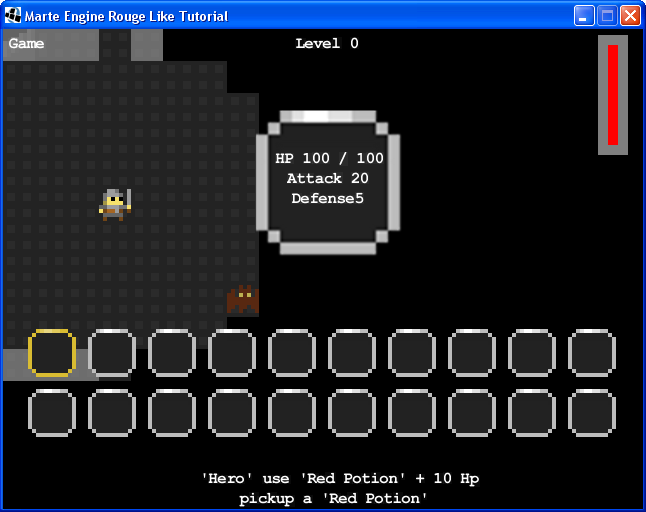
I have stats and inventory!

As you can see, interface is ready to display! Just press I and player can navigate using arrows and then select a red potion and use it too:

Use health potion is good!


Just remember to clear GameWorld too:

package merlTut;

import it.marteEngine.Camera;
import it.marteEngine.World;
import it.marteEngine.entity.Entity;

import java.util.ArrayList;
import java.util.List;

import org.newdawn.slick.GameContainer;
import org.newdawn.slick.Graphics;
import org.newdawn.slick.Input;
import org.newdawn.slick.SlickException;
import org.newdawn.slick.geom.Vector2f;
import org.newdawn.slick.state.StateBasedGame;

public class GameWorld extends World {

 public Hero hero;

 private int tileWidth = 40;
 private int tileHeight = 30;

 public Level level;

 private static final int tileSize = 8;
 private static final int scaleFactor = 4;

 private CreatureFactory creatureFactory;
 private ItemFactory itemFactory;

 public List messages;

 public LevelBuilder levelBuilder;

 public int depth = 0;

 private boolean newLevel;

 private Hud hud;
 
 public GameWorld(int id, GameContainer container) {
  super(id, container);

  creatureFactory = new CreatureFactory(this);
  itemFactory = new ItemFactory();
  messages = new ArrayList();
  
  hud= new Hud(container,messages);
 }

 @Override
 public void render(GameContainer container, StateBasedGame game, Graphics g)
   throws SlickException {
  super.render(container, game, g);
  
  g.drawString("Game", 5, 5);
  // depth indicator
  hud.drawCentered(container, g, "Level " + depth, 5);
  // render hud
  hud.render(container, game, g);
 }

 @Override
 public void update(GameContainer container, StateBasedGame game, int delta)
   throws SlickException {
  super.update(container, game, delta);

  Input input = container.getInput();
  if (input.isKeyPressed(Input.KEY_ESCAPE)) {
   // goto menu world
   game.enterState(0);
  }

  hud.update(container, game, delta);
  
  if (hero.moved) {
   updateAi();
  }

  if (newLevel) {
   newLevel = false;
   newLevel();
  }
 }

 private void updateAi() {
  for (Entity ent : getEntities()) {
   if (ent instanceof Creature) {
    Creature creature = (Creature) ent;
    creature.updateAi();

   }
  }
 }

 @Override
 public void enter(GameContainer container, StateBasedGame game)
   throws SlickException {
  newLevel();
 }

 private void newLevel() {
  // we destroy everything
  clear();
  // add random generated cave
  levelBuilder = new LevelBuilder(tileWidth, tileHeight).makeCaves()
    .addStairs();
  level = levelBuilder.build();
  addAll(level.getEntities(), GAME);
  // add some fungus at free random locations
  for (int i = 0; i < 8; i++) {
   addAtEmptyRandomLocation(creatureFactory.newFungus());
  }
  //add some bats
  for (int i = 0; i < 15; i++) {
   addAtEmptyRandomLocation(creatureFactory.newBat());   
  }
  // add hero at first free place
  hero = creatureFactory.newHero();
  addAtEmptyLocation(hero);

  
  // add some random items
  for (int i = 0; i < 20; i++) {
   addAtEmptyRandomLocation(itemFactory.newPotionRed());
  }
  addAtEmptyRandomLocation(itemFactory.newGoldKey());  
  
  addAtEmptyRandomLocation(itemFactory.newSteelSword());


  // setting camera:
  this.setCamera(new Camera(this, hero, container.getWidth(), container
    .getHeight(), 512, 512, new Vector2f(32, 32)));
  setWidth(tileWidth * tileSize * scaleFactor);
  setHeight(tileHeight * tileSize * scaleFactor);

  hud.clear(hero);
 }

 public void addAtEmptyRandomLocation(GameEntity entity) {
  int x;
  int y;
  do {
   x = (int) (Math.random() * tileWidth);
   y = (int) (Math.random() * tileHeight);
  } while (!levelBuilder.isFree(x, y));

  entity.x = x * tileSize * scaleFactor;
  entity.y = y * tileSize * scaleFactor;
  add(entity);
 }

 public void addAtEmptyLocation(Creature creature) {
  Vector2f pos;
  do {
   pos = levelBuilder.findFreePlace();
  } while (!levelBuilder.isFree((int) pos.x, (int) pos.y));

  creature.x = pos.x * tileSize * scaleFactor;
  creature.y = pos.y * tileSize * scaleFactor;
  add(creature);
 }

 public void goDown() {
  depth++;
  newLevel = true;
 }

 public void goUp() {
  if (depth - 1 >= 0) {
   depth--;
   newLevel = true;
  }
 }

 public Tile tile(int wx, int wy) {
  for (Entity ent : getEntities()) {
   if (ent!=null && ent.x == wx && ent.y == wy){
    if (ent instanceof Tile){
     return (Tile) ent;
    }
   }
  }
  return new Tile(wx,wy, Tile.FLOOR, false, 0, 5);
 }
 
 public Item item(int wx, int wy) {
  for (Entity ent : getEntities()) {
   if (ent!=null && ent.x == wx && ent.y == wy){
    if (ent instanceof Item){
     return (Item) ent;
    }
   }
  }
  // TODO: pensare oggetto vuoto!
  return new Item(wx,wy, Tile.FLOOR, false, 0, 5);
 }
 
 @Override
 public void keyPressed(int key, char c) {
  hud.keyPressed(key, c);
 }

}
You can see the trick? We are also adding new items: steel sword and gold key! See complete code of this tutorial for more informations!

Conclusion 

Explain all work done in this tutorial is hard topic, but following simple steps is simple. We have defined first and item, then an inventory. So player interact with inventory using an inventory screen, defined into a Hud class.

You can download source code here.

Wednesday, May 9, 2012

Marte Engine Graphic Rogue Like Tutorial 09

0 commenti

Wandering monsters! 

Welcome reader to this tutorial! I'll show you how to build a roguelike with MarteEngine. For more information about MarteEngine, please see http://github.com/Gornova/MarteEngine. This tutorial is inspired from same serie from Trystan and follow the same organization, so let's start!
In this tutorial we'll add more interesting type of monsters, wandering one!

Bat 

First of all we need to define bat class:

package merlTut;

import it.marteEngine.ResourceManager;

public class Bat extends Creature {

 public Bat(float x, float y, int maxHp, int attack, int defense,
   int visionRadius) {
  super(x * tileSize * scaleFactor, y * tileSize * scaleFactor, maxHp,
    attack, defense, visionRadius);

  setGraphic(ResourceManager.getSpriteSheet("char").getSubImage(14, 12)
    .getScaledCopy(scaleFactor));

  addType(BAT);
  setHitBox(0, 0, tileSize * scaleFactor, tileSize * scaleFactor);
 }
 
}

Because we have already defined Creature class for Fungus, adding a new monster is not an hard task, just add new Creature type on Creature class:

 public final String BAT = "bat";

and add a check on move method:

    public void move(int dx, int dy) {
  float cx = x + dx * step;
  float cy = y + dy * step;
  if (cx >=0 && cx < world.width && cy > 0 && cy < world.height){
   if (collide(new String[]{Tile.WALL,FUNGUS, Tile.STAIRS_UP, Tile.STAIRS_DOWN, BAT}, cx, cy) == null) {
    x = cx;
    y = cy;
   }
  }
 }

Bat is a wandering monsters so add a wander method on CreatureAi class:
 
    public void wander(){
        int mx = (int)(Math.random() * 3) - 1;
        int my = (int)(Math.random() * 3) - 1;
        creature.move(mx, my);
    }

Like for Trystan's tutorial wander it's simple enough for our bat, so define a BatAi using wandering:

package merlTut;

import it.marteEngine.entity.Entity;

public class BatAi extends CreatureAi {

    private CreatureFactory factory;

 public BatAi(Creature creature, CreatureFactory factory) {
        super(creature);
        this.factory = factory;
    }

 @Override
    public void update(){
        wander();
        wander();
    }
 
 @Override
 public void collide(Entity other) {
  if (other instanceof Hero) {
   Hero hero = (Hero)other;
   hero.attack(creature);
  }
 } 
}

Adding bats to the game

We add to Creature factory an utility method for bats:

public Bat newBat(){
  Bat bat = new Bat(0, 0,10,0,0,0);
  bat.name = "Bat";
  bat.setCreatureAi(new BatAi(bat,this));
  return bat;
 }

and call it from GameWorld newLevel method:

private void newLevel() {
  // we destroy everything
  clear();
  // add random generated cave
  levelBuilder = new LevelBuilder(tileWidth, tileHeight).makeCaves()
    .addStairs();
  level = levelBuilder.build();
  addAll(level.getEntities(), GAME);
  // add some fungus at free random locations
  for (int i = 0; i < 8; i++) {
   addAtEmptyRandomLocation(creatureFactory.newFungus());
  }
  //add some bats
  for (int i = 0; i < 15; i++) {
   addAtEmptyRandomLocation(creatureFactory.newBat());   
  }
  // add hero at first free place
  hero = creatureFactory.newHero();
  addAtEmptyLocation(hero);

  // setting camera:
  this.setCamera(new Camera(this, hero, container.getWidth(), container
    .getHeight(), 512, 512, new Vector2f(32, 32)));
  setWidth(tileWidth * tileSize * scaleFactor);
  setHeight(tileHeight * tileSize * scaleFactor);

  messages.clear();
  clearMessagesTimer = 0;
 }
Fifhteen bats is enough for now!

Bats.. everywhere!

 Conclusion 

Adding new creatures is easy: decide image on spritesheet, define a new class, a new ai and using CreatureFactory we can add new bats in our dungeons!

You can download source code from here.

Wednesday, May 2, 2012

Marte Engine Graphic Rogue Like Tutorial 08

0 commenti

Concept, Line, Field of view, Fog of war 

Welcome reader to this tutorial! I'll show you how to build a roguelike with MarteEngine. For more information about MarteEngine, please see http://github.com/Gornova/MarteEngine. This tutorial is inspired from same serie from Trystan and follow the same organization, so let's start!
In this tutorial we'll explore how to use and handle line of sight and field of view, because our hero cannot see through walls!

Concept 

To understand what we are doing, thing about what is around you. For every object or creature around you, you can draw an invisible line between your eyes and target. This is called Field of view: in reality you cannot see behind you without movement, but this is a videogame, so we can imagine that brave hero have legendary senses to "feel" positions of walls, creatures, object even behind him!

Line 

We start to define a line, using Bresenham's Line algoritm  and follow Trystan's implementation in Java:

package merlTut;

import java.util.ArrayList;
import java.util.Iterator;
import java.util.List;

import org.newdawn.slick.geom.Point;

public class Line implements Iterable {
 private List points;
 
 private int scaleFactor = 4;
 private int tileSize = 8;
 private int step = scaleFactor * tileSize;

 public List getPoints() {
  return points;
 }

 public Line(int x0, int y0, int x1, int y1) {
  points = new ArrayList();

  int dx = Math.abs(x1 - x0);
  int dy = Math.abs(y1 - y0);

  int sx = x0 < x1 ? step : -step;
  int sy = y0 < y1 ? step : -step;
  int err = dx - dy;

  while (true) {
   points.add(new Point(x0, y0));

   if (x0 == x1 && y0 == y1)
    break;

   int e2 = err * 2;
   if (e2 > -dx) {
    err -= dy;
    x0 += sx;
   }
   if (e2 < dx) {
    err += dx;
    y0 += sy;
   }
  }
 }

 @Override
 public Iterator iterator() {
  return points.iterator();
 }
} 

As you can see Line it's only a collection of points, each one have a difference of a step. A step (1 in trystan's example, 32 in our example), is just consequence of what we are using. Because we decided to use oryx's tilesets with 8 pixel of sizes and scale them factor of 4, step is 8*4 =32. Simple enough, right?

Tile 

We need to understand, before draw a line, if something will stop line of sight. We just add to Tile class this method:
 public boolean isGround() {
  if (isType(FLOOR)){
   return true;
  }
  return false;
 }

For now, everything stop line of sight, except Floor type. This is intuitive, but we can change that later. Little objects (gold?), will not stop line of sight of our hero!

Creatures vision radius 

We need to add to creature vision radius property:

    private int visionRadius;
    public int visionRadius() { return visionRadius; }
    
    public Creature(float x, float y, int maxHp, int attack, int defense, int visionRadius) {
  super(x, y);
  this.hp = maxHp;
  this.maxHp = maxHp;
  this.attackValue = attack;
  this.defenseValue = defense;
  this.visionRadius = visionRadius;
 }

and use implement this statistic into Hero and Fungus classes:

 public Hero(float x, float y, GameWorld gameWorld, int maxHp, int attackValue, int defenseValue, int visionRadius) {
  super(x*tileSize*scaleFactor, y*tileSize*scaleFactor, maxHp, attackValue, defenseValue, visionRadius);
 ...
 
 
 public Fungus(float x, float y, int maxHp, int attackValue, int defenseValue, int visionRadius) {
  super(x * tileSize * scaleFactor, y * tileSize * scaleFactor, maxHp,
    attackValue, defenseValue, visionRadius);
   
Of course we need to change CreatureFactory to set visionRadius:

package merlTut;

public class CreatureFactory {

 private GameWorld world;

 public CreatureFactory(GameWorld world){
  this.world = world;
 }
 
 public Hero newHero(){
  Hero hero =  new Hero(0, 0, world,100,20,5,7 * 32);
  hero.name = "Hero";
  hero.setCreatureAi(new PlayerAi(hero, world.messages));
  return hero;
 }
 
 public Fungus newFungus(){
  Fungus fungus = new Fungus(0, 0,10,0,0,0);
  fungus.name = "Fungus";
  fungus.setCreatureAi(new FungusAI(fungus,this));
  return fungus;
 }
}

I agree with Trystan's approach. If everything was set using constructor, adding new parameter rise new errors on Eclipse (or your IDE), BUT help you in create an object (a creature in our case) without forgetting any crucial properties not set.

Having a such important value without using it is not so good, so add a canSee method on creature:

 public boolean canSee(Entity creature) {
  return creatureAi.canSee((int)creature.x, (int)creature.y);
 }

we delegate implementation to creatureAi, but instead to implement function in every CreatureAi (FungusAi, PlayerAi) we put this implementation directly into CreatureAi:

 public boolean canSee(int wx, int wy) {
  if ((creature.x - wx) * (creature.x - wx) + (creature.y - wy)
    * (creature.y - wy) > creature.visionRadius()
    * creature.visionRadius())
   return false;

  for (Point p : new Line((int)creature.x, (int)creature.y, wx, wy)) {
   if (creature.tile((int)p.getX(), (int)p.getY()).isGround() || p.getX() == wx
     && p.getY() == wy)
    continue;

   return false;
  }

  return true;
 }

I'm not sure this is the best idea, but later having in each ai implementation a useful method like this one will help creature's ai to make better decisions! Tile You can notice that there is an undefined method on creature: tile. We'll do it now!

    public Tile tile(int wx, int wy) {
        return ((GameWorld)world).tile(wx, wy);
    } 

Again we delegate to gameWorld to find right tile at given coordinate:

 public Tile tile(int wx, int wy) {
  for (Entity ent : getEntities()) {
   if (ent!=null && ent.x == wx && ent.y == wy){
    if (ent instanceof Tile){
     return (Tile) ent;
    }
   }
  }
  return null;
 }

Code is self-explanatory: just check every entities that are on given coordinate and if is a tile, return it!

Field of view 

Because all rendering logic is called into GameWorld.render method, we need to change it! Remember initial thoughts? World is rendered on screen only if hero can see it, so we need to check this. I've added a new function on GameWorld:

 private void fieldOfView() {
  for (Entity ent : getEntities()) {
   if (!ent.equals(hero)|| (ent.name != null && ent.name.equalsIgnoreCase("hero"))){
    if (hero.canSee(ent)){
     ent.visible = true;
    } else {
     ent.visible = false;
    }
   }
  }
 }

The tricky part here is how MarteEngine render eneities: because every entity have a visible attribute, we can decide, BEFORE draw it, if hero see it (visibile= true) or not (visible = false). Later, in render method, we can call before fieldOfView and then super.render, so MarteEngine will draw for us all entities, according to camera and more important visibile attribute:

 @Override
 public void render(GameContainer container, StateBasedGame game, Graphics g)
   throws SlickException {
  fieldOfView();  
  super.render(container, game, g);
  
  g.drawString("Game", 5, 5);
  // hero stats
  displayHp(container, g);
  // display messages
  displayMessages(container, g);
  // depth indicator
  drawCentered(container, g, "Level " + depth, 5);
 }

What's happening? I cannot see .. everything? Black magic!


Fog of War 

Hero and player too, have memory, so why not add of of war? For ones are not familiar with this concept, think about where you are. You always remember walls seen before, even if now are out of your sight, right? We can represent this on our little game using a simple trick: sign what tiles, creature (ours games objects) have seen before and then draw on top of it a transparent gray image. So first, of all, build a simple 32x32 gray transparent image (I've used Gimp), here my result:

gray boxes everywhere!

As mentioned in second tutorial, with MarteEngine we need to map these resources using resources.xml file. For a single image you should add a line like this one:


We need a GameEntity to take care of this common logic between tiles and creatures, so we add it to our project:

package merlTut;

import org.newdawn.slick.GameContainer;
import org.newdawn.slick.Graphics;
import org.newdawn.slick.SlickException;

import it.marteEngine.ResourceManager;
import it.marteEngine.entity.Entity;

public class GameEntity extends Entity {

 private boolean saw = false;
 
 public GameEntity(float x, float y) {
  super(x, y);
 }
 
 @Override
 public void render(GameContainer container, Graphics g)
   throws SlickException {
  GameWorld gameWorld = (GameWorld) world;
  if (gameWorld.hero.canSee(this)) {
   saw = true;
   super.render(container, g);
  } else {
   if (saw && !(this instanceof Creature)) {
    super.render(container, g);
    g.drawImage(ResourceManager.getImage("box"), x, y);
   }
  }
 }
}

Render method is simple enough: when hero can see other GameEntities, we remember this line of sight and after, when object is out of sight, we draw the box after GameObject image. Using this class we need to extend with Tile and Creature class from GameEntity:

 public abstract class Creature extends GameEntity {

and

 public class Tile extends GameEntity {

a simple change to add a useful feature for player

I must remember something.. must be an exit!
We decrease a little hero's vision radius from 7 to 5, now that we have implemented fog of war. Where? Obviously in CreatureFactory:

package merlTut;


public class CreatureFactory {

 private GameWorld world;

 public CreatureFactory(GameWorld world){
  this.world = world;
 }
 
 public Hero newHero(){
  Hero hero =  new Hero(0, 0, world,100,20,5,5 * 32);
  hero.name = "Hero";
  hero.setCreatureAi(new PlayerAi(hero, world.messages));
  return hero;
 }
 
 public Fungus newFungus(){
  Fungus fungus = new Fungus(0, 0,10,0,0,0);
  fungus.name = "Fungus";
  fungus.setCreatureAi(new FungusAI(fungus,this));
  return fungus;
 }
}

Conclusion 

Using Bresenham's Line algoritm it's possible to have a simple field of view for our game, without pain. Again there are lot of choices to do here, with many tecniques (as Trystan suggests).
And with a little effort have ready fog of war too!

You can download source code from here.

Wednesday, April 25, 2012

Marte Engine Graphic Rogue Like Tutorial 07

0 commenti
More levels 

 Welcome reader to this tutorial! I'll show you how to build a roguelike with MarteEngine. For more information about MarteEngine, please see http://github.com/Gornova/MarteEngine.
This tutorial is inspired from same serie from Trystan and follow the same organization, so let's start! In this tutorial we'll se how to handle different levels.

More Levels 

In our rougelike I'm changing a bit way Trystan's follow: instead adding regions and a full "world" generation, I'll be satisfied with a simple new level generation each time player reach a go down stairs. Again, this ia choice we can always change later and it will require a small bit of code! First we need to add stairs to tiles, adding types:

 public static final String STAIRS_UP = "stairs_up";
 public static final String STAIRS_DOWN = "stairs_down";

and placing it into LevelBuilder:

 public LevelBuilder addStairsUp(){
  start = findFreePlace();
  tiles[(int)start.x][(int)start.y] = Tile.STAIRS_UP;
  return this;
 }

 public LevelBuilder addStairsDown(){
  int x;
  int y;
  do {
         x = (int) (Math.random() * width);
         y = (int) (Math.random() * height);
  } while (!isFree(x, y) && Math.abs(x - start.x) > 10 && Math.abs(y-start.y) > 10);
  end = new Vector2f(x,y);
  tiles[(int)end.x][(int)end.y] = Tile.STAIRS_DOWN;
  return this;
 }
 
Code here is simple: for up stairs, find first free place. Instead for down stairs find a free tile at least 10 tiles distant. As you can notice, I'm also moved findFreePlace and isFree methods from Level class to LevelBuilder, because I need them in level generation, not only on level handling. You need to change Level convert method, to take care of new tiles types:

 public Entity convert(String tile, int x, int y) {
  if (tile.equalsIgnoreCase(Tile.WALL)) {
   return new Tile(x, y, tile, true, 0, 2);
  }
  if (tile.equalsIgnoreCase(Tile.FLOOR)) {
   return new Tile(x, y, tile, false, 0, 5);
  }
  if (tile.equalsIgnoreCase(Tile.STAIRS_UP)) {
   return new Tile(x, y, tile, true, 7, 0);
  }
  if (tile.equalsIgnoreCase(Tile.STAIRS_DOWN)) {
   return new Tile(x, y, tile, true, 8, 0);
  }

We need also to change Creature.move method:

 public void move(int dx, int dy) {
  float cx = x + dx * step;
  float cy = y + dy * step;
  if (collide(new String[]{Tile.WALL,FUNGUS, Tile.STAIRS_UP, Tile.STAIRS_DOWN}, cx, cy) == null) {
   x = cx;
   y = cy;
  }
 }

So when a creature move, we check also stairs! Almost finished, we responde collision on PlayerAi collide method:

 public void collide(Entity other) {
  if (other instanceof Tile) {
   Tile tile = (Tile) other;
   if (tile.isDiggable()) {
    tile.changeType(Tile.FLOOR);
   }
   if (tile.isType(Tile.STAIRS_UP)){
    ((GameWorld)creature.world).goUp();
   }
   if (tile.isType(Tile.STAIRS_DOWN)){
    ((GameWorld)creature.world).goDown();    
   }   
  }
 }

And of course change GameWorld class:

package merlTut;

import it.marteEngine.Camera;
import it.marteEngine.World;
import it.marteEngine.entity.Entity;

import java.util.ArrayList;
import java.util.List;

import org.newdawn.slick.Color;
import org.newdawn.slick.GameContainer;
import org.newdawn.slick.Graphics;
import org.newdawn.slick.Input;
import org.newdawn.slick.SlickException;
import org.newdawn.slick.geom.Vector2f;
import org.newdawn.slick.state.StateBasedGame;

public class GameWorld extends World {

 private Hero hero;

 private int tileWidth = 40;
 private int tileHeight = 30;

 public Level level;

 private static final int tileSize = 8;
 private static final int scaleFactor = 4;

 private CreatureFactory creatureFactory;

 public List messages;

 private int clearMessagesTimer;

 public LevelBuilder levelBuilder;

 public int depth = 0;

 private boolean newLevel;

 public GameWorld(int id, GameContainer container) {
  super(id, container);

  creatureFactory = new CreatureFactory(this);
  messages = new ArrayList();
 }

 @Override
 public void render(GameContainer container, StateBasedGame game, Graphics g)
   throws SlickException {
  super.render(container, game, g);
  g.drawString("Game", 5, 5);

  // hero stats
  displayHp(container, g);
  // display messages
  displayMessages(container, g);
  // depth indicator
  drawCentered(container, g, "Level " + depth, 5);
 }

 @Override
 public void update(GameContainer container, StateBasedGame game, int delta)
   throws SlickException {
  super.update(container, game, delta);

  Input input = container.getInput();
  if (input.isKeyPressed(Input.KEY_ESCAPE)) {
   // goto menu world
   game.enterState(0);
  }

  if (hero.moved) {
   clearMessagesTimer++;
   updateAi();
  }

  if (newLevel) {
   newLevel = false;
   newLevel();
  }
 }

 private void updateAi() {
  for (Entity ent : getEntities()) {
   if (ent instanceof Creature) {
    Creature creature = (Creature) ent;
    creature.updateAi();

   }
  }
 }

 @Override
 public void enter(GameContainer container, StateBasedGame game)
   throws SlickException {
  newLevel();
 }

 private void newLevel() {
  // we destroy everything
  clear();
  // add random generated cave
  levelBuilder = new LevelBuilder(tileWidth, tileHeight).makeCaves()
    .addStairs();
  level = levelBuilder.build();
  addAll(level.getEntities(), GAME);
  // add some fungus at free random locations
  for (int i = 0; i < 8; i++) {
   addAtEmptyRandomLocation(creatureFactory.newFungus());
  }
  // add hero at first free place
  hero = creatureFactory.newHero();
  addAtEmptyLocation(hero);

  // setting camera:
  this.setCamera(new Camera(this, hero, container.getWidth(), container
    .getHeight(), 512, 512, new Vector2f(32, 32)));
  setWidth(tileWidth * tileSize * scaleFactor);
  setHeight(tileHeight * tileSize * scaleFactor);

  messages.clear();
  clearMessagesTimer = 0;
 }

 public void addAtEmptyRandomLocation(Creature creature) {
  int x;
  int y;
  do {
   x = (int) (Math.random() * tileWidth);
   y = (int) (Math.random() * tileHeight);
  } while (!levelBuilder.isFree(x, y));

  creature.x = x * tileSize * scaleFactor;
  creature.y = y * tileSize * scaleFactor;
  add(creature);
 }

 public void addAtEmptyLocation(Creature creature) {
  Vector2f pos;
  do {
   pos = levelBuilder.findFreePlace();
  } while (!levelBuilder.isFree((int) pos.x, (int) pos.y));

  creature.x = pos.x * tileSize * scaleFactor;
  creature.y = pos.y * tileSize * scaleFactor;
  add(creature);
 }

 private void displayMessages(GameContainer container, Graphics g) {
  int bottom = container.getHeight() - 20;
  for (int i = 0; i < messages.size(); i++) {
   drawCentered(container, g, messages.get(i), bottom - i * 20);
  }
  if (messages.isEmpty()) {
   clearMessagesTimer = 0;
  }
  if (messages.size() > 5
    || (clearMessagesTimer > 7 && !messages.isEmpty())) {
   clearMessagesTimer = 0;
   messages.remove(0);
  }
 }

 private void drawCentered(GameContainer container, Graphics g, String text,
   int y) {
  g.drawString(text, container.getWidth() / 2 - text.length() * 4, y);
 }

 private void displayHp(GameContainer container, Graphics g) {
  int total = hero.maxHp();
  int current = hero.hp();
  g.setColor(Color.red);
  if (total - current > 0) {
   g.fillRect(container.getWidth() - 40, 10 + total - current, 20,
     10 + current);
  } else {
   g.fillRect(container.getWidth() - 40, 10, 20, 10 + current);
  }
  g.setColor(Color.gray);
  g.setLineWidth(10);
  g.drawRect(container.getWidth() - 40, 10, 20, 10 + total);
  g.setColor(Color.white);
  g.setLineWidth(1);
 }

 public void goDown() {
  depth++;
  newLevel = true;
 }

 public void goUp() {
  if (depth - 1 >= 0) {
   depth--;
   newLevel = true;
  }
 }
}

As you can read, we change a little the code, using depth variable to remember at what depth hero is and introducing a new method newLevel

will be an exit.. or just another dungeon?

Conclusion 

In this tutorial we have seen how to generate a new level when player use stairs up and down, changing a little our code, but without many changes!

You can download source code from here.

Wednesday, April 18, 2012

Marte Engine Graphic Rogue Like Tutorial 06

0 commenti
Hitpoints, combat, messages 

Welcome reader to this tutorial! I'll show you how to build a roguelike with MarteEngine. For more information about MarteEngine, please see http://github.com/Gornova/MarteEngine. This tutorial is inspired from same serie from Trystan and follow the same organization, so let's start!
In this tutorial we'll se how to take care of combat and feedback for player Hitpoints I'm following Trystan's tutorial line to line for this topic: just add max hitpoints, current hitpoint and attack and defense to Creature class:

package merlTut;

import it.marteEngine.entity.Entity;

public abstract class Creature extends Entity {

 private CreatureAi creatureAi;

 public static final int tileSize = 8;
 public static final int scaleFactor = 4;
 public static final int step = tileSize * scaleFactor;
 
 public final String FUNGUS = "fungus";

 public boolean moved = false;
 
 private int maxHp;
    public int maxHp() { return maxHp; }
 
    private int hp;
    public int hp() { return hp; }
 
    private int attackValue;
    public int attackValue() { return attackValue; }
 
    private int defenseValue;
    public int defenseValue() { return defenseValue; } 
 
 public Creature(float x, float y, int maxHp, int attack, int defense) {
  super(x, y);
  this.maxHp = maxHp;
  this.attackValue = attack;
  this.defenseValue = defense;
 }

 public void setCreatureAi(CreatureAi ai) {
  this.creatureAi = ai;
 }

 public void move(int dx, int dy) {
  float cx = x + dx * step;
  float cy = y + dy * step;
  if (collide(new String[]{Tile.WALL,FUNGUS}, cx, cy) == null) {
   x = cx;
   y = cy;
  }
 }
 
 @Override
 public void collisionResponse(Entity other) {
  creatureAi.collide(other);
 }
 
 public void updateAi() {
  creatureAi.update();
 }
 
 public void attack(Creature other){
        int amount = Math.max(0, attackValue() - other.defenseValue());
     
        amount = (int)(Math.random() * amount) + 1;
     
        other.modifyHp(-amount);
    }
 
    public void modifyHp(int amount) {
        hp += amount;
     
        if (hp < 1)
         world.remove(this);
    } 

}

You can notice that attacking another creature will be a simple formula. Involves just attackvalue - defense value, plus of course some random value. Display hero's hp Now every creature have hitpoints, but player care in particular of brave hero's one. So let's display them! Add into GameWorld.render:

 @Override
 public void render(GameContainer container, StateBasedGame game, Graphics g)
   throws SlickException {
  super.render(container, game, g);
  g.drawString("Game", 5, 5);
  
  // hero stats
  displayHp(container,g);
 }
 
 
 private void displayHp(GameContainer container, Graphics g) {
  int total = hero.maxHp();
  int current = hero.hp();
  g.setColor(Color.red);  
  if (total - current > 0){
   g.fillRect(container.getWidth()-40, 10+total-current, 20, 10+current);
  } else {
   g.fillRect(container.getWidth()-40, 10, 20, 10+current);
  }
  g.setColor(Color.gray);
  g.setLineWidth(10);
  g.drawRect(container.getWidth()-40, 10, 20, 10+total);
  g.setColor(Color.white);
 }
 
Mighty health bar!


If you run the game, can see a basic health bar on right of the screen! Messages Put some messages on screen is easy, first add a notify method on Creature class:

    public void notify(String message, Object ... params){
        creatureAi.onNotify(String.format(message, params));
    }

and on CreatureAi corresponding method too:

 public void onNotify(String format) {
 }

So let's start from PlayerAi: add a list of messages to handle a reference of it:

package merlTut;

import java.util.List;

import it.marteEngine.entity.Entity;

public class PlayerAi extends CreatureAi {
 
    private List messages; 

 public PlayerAi(Creature creature, List messages) {
  super(creature);
  this.messages = messages;
 }

 public void collide(Entity other) {
  if (other instanceof Tile) {
   Tile tile = (Tile) other;
   if (tile.isDiggable()) {
    tile.changeType(Tile.FLOOR);
   }
  }
 }
 
    public void onNotify(String message){
        messages.add(message);
    } 

}

and change CreatureFactory, adding reference of GameWorld messages:

 public Hero newHero(){
  Hero hero =  new Hero(0, 0, world,100,20,5);
  hero.name = "Hero";
  hero.setCreatureAi(new PlayerAi(hero, world.messages));
  return hero;
 }

and finally add reference on GameWorld:

 public List messages;

 public GameWorld(int id, GameContainer container) {
  super(id, container);
  
  creatureFactory = new CreatureFactory(this);
     messages = new ArrayList();  
 }

Now it's time to display messages in GameWorld:

 @Override
 public void render(GameContainer container, StateBasedGame game, Graphics g)
   throws SlickException {
  super.render(container, game, g);
  g.drawString("Game", 5, 5);
  
  // hero stats
  displayHp(container,g);
  // display messages
  displayMessages(container,g);
 }

using this utility methods:

 private void displayMessages(GameContainer container, Graphics g) {
     int bottom = container.getHeight() -20;
     for (int i = 0; i < messages.size(); i++){
      drawCentered(container, g,messages.get(i),bottom - i*20 );
     }
     if (messages.isEmpty()){
      clearMessagesTimer = 0;
     }
     if (messages.size() > 5 || (clearMessagesTimer > 7 && !messages.isEmpty())){
      clearMessagesTimer = 0;
      messages.remove(0);
     }
 }
 
 private void drawCentered(GameContainer container, Graphics g, String text, int y){
  g.drawString(text, container.getWidth()/2 -text.length()*4, y);
 }

Remember to cleare messages onEnter gameWorld adding this lines of code:

  messages.clear();
  clearMessagesTimer= 0;

Now don't forget to add some messages, for example of combat on creature attack method:

 public void attack(Creature other){
        int amount = Math.max(0, attackValue() - other.defenseValue());
     
        amount = (int)(Math.random() * amount) + 1;
     
        other.modifyHp(-amount);
        
        notify(name+" attack the '%s' for %d damage.", other.name, amount);
        other.notify("The '%s' attacks you for %d damage.", name, amount);
    }

Note: I've tried to add some messages when Fungus spread, but is not so useful or after a bit so boring that I wipe out. But is possibile add messages from every creature!

Conclusion 

Heroes talks to someone?

In this tutorial we have done a little Gui for your player: now game display hero hp and some messages from combat, useful to understand what's going on!

As usual you can find source code here.

Wednesday, April 11, 2012

Marte Engine Graphic Rogue Like Tutorial 05

0 commenti

Stationary monsters! 

Welcome reader to this tutorial! I'll show you how to build a roguelike with MarteEngine. For more information about MarteEngine, please see http://github.com/Gornova/MarteEngine. This tutorial is inspired from same serie from Trystan and follow the same organization, so let's start!
In this tutorial we'll se how to create stationary monsters, basic type of monsters Fungus Let's create a new Creature, Fungus:

package merlTut;

import it.marteEngine.ResourceManager;

public class Fungus extends Creature {

 public Fungus(float x, float y) {
  super(x*tileSize*scaleFactor, y*tileSize*scaleFactor);
  
  setGraphic(ResourceManager.getSpriteSheet("env").getSubImage(12, 6).getScaledCopy(scaleFactor));
  
  addType(FUNGUS);
  setHitBox(0, 0, tileSize*scaleFactor, tileSize*scaleFactor);
 }

}

and don't forgot to add Creature Type FUNGUS con Creature class:

 public final String FUNGUS = "fungus";

Add FungusAi, boring for now, I know that!

package merlTut;

public class FungusAI extends CreatureAi {

 public FungusAI(Creature creature) {
  super(creature);
 }

}

And add a CreatureFactory. A factory is a class that builds new classes so it's easy to add, in our case, creatures:

package merlTut;


public class CreatureFactory {

 private GameWorld world;

 public CreatureFactory(GameWorld world){
  this.world = world;
 }
 
 public Hero newHero(){
  Hero hero =  new Hero(0, 0, world);
  hero.setCreatureAi(new PlayerAi(hero));
  return hero;
 }
 
 public Fungus newFungus(){
  Fungus fungus = new Fungus(0, 0);
  fungus.setCreatureAi(new FungusAI(fungus));
  return fungus;
 }
 
}

We include two factory methods: Fungus and Hero. Notice that we don't set creature position, because we need some information about tiles for that. I've thought about this and Trystan's solution is simple enought to help us layer, so take a look to GameWorld constructor method:

 private CreatureFactory creatureFactory;

 public GameWorld(int id, GameContainer container) {
  super(id, container);
  
  creatureFactory = new CreatureFactory(this);
 }

We add creatureFactory variable for GameWorld, so we can use it later on enter method:

 @Override
 public void enter(GameContainer container, StateBasedGame game)
   throws SlickException {
  // we destroy everything
  clear();
  // add random generated cave
  level = new LevelBuilder(tileWidth, tileHeight).makeCaves().build();
  addAll(level.getEntities(), GAME);
  // add some fungus at free random locations
  for (int i = 0; i < 8; i++) {
   addAtEmptyRandomLocation(creatureFactory.newFungus());   
  }
  // add hero at first free place
  hero = creatureFactory.newHero();
  addAtEmptyLocation(hero);
  
  // setting camera:
  this.setCamera(new Camera(this, hero, container.getWidth(), container.getHeight(),512,512,new Vector2f(32,32)));  
  setWidth(tileWidth*tileSize*scaleFactor);
  setHeight(tileHeight*tileSize*scaleFactor);
 }

Using creature factory we can create creatures in one line and add into game at random or first free position, using this utility methods:

 public void addAtEmptyRandomLocation(Creature creature){
  int x;
  int y;
  do {
         x = (int)(Math.random() * tileWidth);
         y = (int)(Math.random() * tileHeight);
  } while (!level.isFree(x, y));
  
  creature.x = x*tileSize*scaleFactor;
  creature.y =y*tileSize*scaleFactor;
  add(creature);
 }
 
 public void addAtEmptyLocation(Creature creature){
  Vector2f pos ;
  do {
         pos =level.findFreePlace();
  } while (!level.isFree((int)pos.x, (int)pos.y));
  
  creature.x = pos.x*tileSize*scaleFactor;
  creature.y = pos.y*tileSize*scaleFactor;
  add(creature);
 }

Fungus, good old enemies...

 Killable fungus

You can notice hero can stay on top of Fungus: we add capability to fungus to be killed, changing check of collision on Creature:

 public void move(int dx, int dy) {
  float cx = x + dx * step;
  float cy = y + dy * step;
  if (collide(new String[]{Tile.WALL,FUNGUS}, cx, cy) == null) {
   x = cx;
   y = cy;
  }
 }

We check collision between moving Creature (in our case Hero) and WALL and FUNGUS. Collision is resolved into FungusAi, like for PlayerAi:

package merlTut;

import it.marteEngine.entity.Entity;

public class FungusAI extends CreatureAi {

 public FungusAI(Creature creature) {
  super(creature);
 }
 
 public void collide(Entity other) {
  if (other instanceof Hero) {
   creature.world.remove(creature);
  }
 } 
 
}

And so fungus are killable!

FungusCraft! 

Trystan notice Fungus are pretty boring: static enemy don't nothing. But what if.. fungus spread around? First we need to add an update method on CretureAI:

package merlTut;

import it.marteEngine.entity.Entity;

public abstract class CreatureAi {

 protected Creature creature;
 
    public CreatureAi(Creature creature){
        this.creature = creature;
        this.creature.setCreatureAi(this);
    }
 
 public void collide(Entity other) {
 } 
 
 public void update( ){
 }
 
}

this method will be called when player moves, on every in-game creature. Again, this is our choice: we can think about a real-time rougelike or turnbased one: So ovveride it into FungusAi and define a spread method too:

 @Override
 public void update() {
  if (spreadcount < 5 && Math.random() < 0.02)
   spread();
 }

 private void spread() {
  int tx = (int) creature.x / (tileSize * scaleFactor);
  int ty = (int)creature.y /  (tileSize * scaleFactor);
  int x = (int) (tx + (int) (Math.random() * 11) - 5);
  int y = (int) (ty + (int) (Math.random() * 11) - 5);

  if(!((GameWorld)creature.world).level.isFree(x, y)){
   return;
  }

  spreadcount++;
  
  Creature child = factory.newFungus();
  child.x = x * tileSize * scaleFactor;
  child.y = y * tileSize * scaleFactor;
  ((GameWorld)creature.world).add(child);

 }

A little change for Level.isFree(x,y) to take care of widht and height of the level:

 public boolean isFree(int x, int y){
  if (x>= 0 && y >= 0 && x < width && y < height && tiles[x][y].equalsIgnoreCase(Tile.FLOOR)){
   return true;
  }
  return false;
 }

Again a change on Hero.updateMovements method:

    private void updateMovements() {
        if (pressed(UP) && y- step >=0) {
            move(0, -1);
            moved = true;
        } else if (pressed(DOWN) && y+step < world.height ) {
            move(0, 1);
            moved = true;
        } else if (pressed(RIGHT) && x+step < world.width ) {
            move(1, 0);
            moved = true;
        } else if (pressed(LEFT) && x - step >= 0) {
            move(-1, 0);
            moved = true;
        } else {
            moved = false;
        }
    }

moved variable is true only when player order hero to move, so we can update all other creatures logic in GameWorld.update:

 @Override
 public void update(GameContainer container, StateBasedGame game, int delta)
   throws SlickException {
  super.update(container, game, delta);

  Input input = container.getInput();
  if (input.isKeyPressed(Input.KEY_ESCAPE)) {
   // goto menu world
   game.enterState(0);
  }
  
  if (hero.moved){
   updateAi();
  }
 }

 private void updateAi() {
  for (Entity ent : getEntities()) {
   if (ent instanceof Creature) {
    Creature creature = (Creature) ent;
    creature.updateAi();
   }
  }
 }
Because in MarteEngine's world we have tiles, creatures and other types of entities, we must update Ai for creature type only.

Conclusion 

Fungus everywhere... why??

 With little effort we can add any type of creature using CreatureFactory and act like we want using CreatureAi implementations. Fungus spread is only an example of what we can do: for example now we can define Fungus with same graphics but with different behaviours, using different FungusAi implementations.

You can download source code here.

Wednesday, April 4, 2012

Marte Engine Graphic Rogue Like Tutorial 04

0 commenti

Creature and CreatureAi, Hero and digging 

Welcome reader to this tutorial! I'll show you how to build a roguelike with MarteEngine. For more information about MarteEngine, please see http://github.com/Gornova/MarteEngine. This tutorial is inspired from same serie from Trystan and follow the same organization, so let's start!
In this fourth tutorial we will see how to organize your creatures (hero and enemies, and why not, allies too!) code in a nice way.

First, some thoughts 

Organize your creature code is a matter of choices: no one could tell you "you are wrong here!", because you decide your scope and your idea of what a rougelike is. In our game we need to take care of many interactions between player and other creatures and (in future) objects. My choice is to follow Trystan's solution (adapted to MarteEngine characteristics) and build an abstract Creature class that extends MarteEngine's Entity and put in this superclass all utility code we need, for example collision detection (happens only when player move for now) and collision response. Again, Delegation Pattern seems right choice: have a CreatureAi abstract class and delegate to concrete class how to handle collision response.
In our case, when player move and collide with a wall, can dig it. It's seems over complicated for now, but think in great: different creatures with different types of response on hero actions or other creature's actions: mess this kind of logic with creature basic logic (loading sprite, render logic or update cycle from slick) not seems so good! Creature and CreatureAi As explained we follow Trystan's tutorial and add two abstract classes:

package merlTut;

import it.marteEngine.entity.Entity;

public abstract class Creature extends Entity {

 private CreatureAi creatureAi;

 public static final int tileSize = 8;
 public static final int scaleFactor = 4;
 public static final int step = tileSize * scaleFactor;

 public Creature(float x, float y) {
  super(x, y);
 }

 public void setCreatureAi(CreatureAi ai) {
  this.creatureAi = ai;
 }

 public void move(int dx, int dy) {
  float cx = x + dx * step;
  float cy = y + dy * step;
  if (collide(Tile.WALL, cx, cy) == null) {
   x = cx;
   y = cy;
  }
 }
 
 @Override
 public void collisionResponse(Entity other) {
  creatureAi.collide(other);
 }

}
 
Creature will be extend by our hero later, but note two things: Creature take care to check on move collision with Walls and using collisionResponse callback method of MarteEngine, delegate response to CreatureAi implementation. So take a look to generic CreatureAi:

package merlTut;

import it.marteEngine.entity.Entity;

public abstract class CreatureAi {

 protected Creature creature;
 
        public CreatureAi(Creature creature){
            this.creature = creature;
            this.creature.setCreatureAi(this);
        }
 
 public void collide(Entity other) {
 } 
 
}

Basic, right? Just a reference to creature ai is controlling and here our first Ai, PlayerAi:

package merlTut;

import it.marteEngine.entity.Entity;

public class PlayerAi extends CreatureAi {

 public PlayerAi(Creature creature) {
  super(creature);
 }

 public void collide(Entity other) {
  if (other instanceof Tile) {
   Tile tile = (Tile) other;
   if (tile.isDiggable()) {
    tile.changeType(Tile.FLOOR);
   }
  }
 }
}

With this when there is a collision between hero and a Tile and this tile is diggable, we can change tile into a floor (diiig!). Tile Before see hero code, change of Tile class are required, just add this two methods:
 public boolean isDiggable(){
  if (isType(WALL)){
   return true;
  }
  return false;  
 }
 
 public void changeType(String type){
  if (type!=null){
   if (type.equalsIgnoreCase(FLOOR)){
    clearTypes();
    addType(FLOOR);
    collidable = false;
    setGraphic(ResourceManager.getSpriteSheet("env").getSubImage(0, 5).getScaledCopy(scaleFactor));
   }
  }
 }
 
and the Hero Because we have a good organization of code before, change of Hero class involves extends Creature instead of Entity:

public class Hero extends Creature {

change updateMovements method:

 private void updateMovements() {
  if (collide(SOLID, x, y - step) == null && pressed(UP) && y- step >=0) {
   move(0, -1);
  } else if (collide(SOLID, x, y + step) == null && pressed(DOWN) && y+step < world.height ) {
   move(0, 1);
  } else if (collide(SOLID, x + step, y) == null && pressed(RIGHT) && x+step < world.width ) {
   move(1, 0);
  } else if (collide(SOLID, x - step, y) == null && pressed(LEFT) && x - step >= 0) {
   move(-1, 0);
  }
 }


and remove move method (with already defined static vars on creature class).


Conclusion 

In this tutorial we have defined a foundation for creatures ai code and collision responses and solved a problem on cave exploration: hero can be trapped inside caves with no exit!

As usual you can find source here.

Monday, March 26, 2012

Marte Engine Graphic Rogue Like Tutorial 03

1 commenti

Camera and random caves 

Welcome reader to this tutorial! I'll show you how to build a roguelike with MarteEngine. For more information about MarteEngine, please see http://github.com/Gornova/MarteEngine. This tutorial is inspired from same series from Trystan and follow the same organization, so let's start! In this third tutorial we want to have camera, scrolling to explore a more vast caves and generate some random caves to explore!


Camera 

Hero want to explore a big cave, but space on pc screen is limited, so we need a camera. First change GameWorld to add it and set following on hero:

package merlTut;

import it.marteEngine.World;

import org.newdawn.slick.GameContainer;
import org.newdawn.slick.Graphics;
import org.newdawn.slick.Input;
import org.newdawn.slick.SlickException;
import org.newdawn.slick.geom.Vector2f;
import org.newdawn.slick.state.StateBasedGame;
import org.newdawn.slick.util.Log;

public class GameWorld extends World {

 private Hero hero;
 

 public GameWorld(int id, GameContainer container) {
  super(id, container);

  hero = new Hero(64, 64);
  add(hero);

  add(new Wall(128, 128));
  add(new Wall(96, 128));
  add(new Wall(64, 128));
  
  this.setCamera(new Camera(this, hero, container.getWidth(), container.getHeight(),512,512,new Vector2f(32,32)));  
 }

 @Override
 public void render(GameContainer container, StateBasedGame game, Graphics g)
   throws SlickException {
  super.render(container, game, g);
  g.drawString("Game", 5, 5);
 }

 @Override
 public void update(GameContainer container, StateBasedGame game, int delta)
   throws SlickException {
  super.update(container, game, delta);

  Input input = container.getInput();
  if (input.isKeyPressed(Input.KEY_ESCAPE)) {
   // goto menu world
   game.enterState(0);
  }
 }

}
 
Run the game, you can see that now that camera follow player in his run!

Random caves 

We want to have a brave hero into some caves, but what is better than some random caves? As mentioned into Trystan blog  it's better to organize your code to handle this. First of all we need to delete Wall class and then add a Tile class, to keep track of all types of tiles in our game:

package merlTut;

import it.marteEngine.ResourceManager;
import it.marteEngine.entity.Entity;

public class Tile extends Entity {

 private static final int tileSize = 8;
 private static final int scaleFactor = 4;

 public static final String WALL = "wall";
 public static final String FLOOR = "floor";
 public static final String BOUNDS = "bounds";

 public Tile(float x, float y, String type, boolean collidable, int sheetx,int sheety) {
  super(x, y);

  setGraphic(ResourceManager.getSpriteSheet("env").getSubImage(sheetx, sheety).getScaledCopy(scaleFactor));

  if (collidable) {
   collidable = true;
   setHitBox(0, 0, tileSize*scaleFactor, tileSize*scaleFactor);
   addType(SOLID);
  } else {
   collidable = false;
   addType(type);
  }
 }

}
 
We keep it simple, just adding some information on constructor: if tile is collidable (floor is not collidable!) and what are coordinates into spritesheet. First we create a Level:

package merlTut;

import java.util.ArrayList;
import java.util.List;

import it.marteEngine.entity.Entity;

public class Level {

 private static final int tileSize = 8;
 private static final int scaleFactor = 4;
 public int width;
 public int height;
 public String[][] tiles;

 public Level(String[][] tiles) {
  this.tiles = tiles;
  this.width = tiles.length;
  this.height = tiles[0].length;
 }

 private Entity convert(String tile, int x, int y) {
  if (tile.equalsIgnoreCase("wall")) {
   return new Tile(x * tileSize*scaleFactor, y * tileSize*scaleFactor, tile, true, 0, 2);
  }
  if (tile.equalsIgnoreCase("floor")) {
   return new Tile(x * tileSize *scaleFactor, y * tileSize*scaleFactor, tile, false, 0, 5);
  }
  return null;
 }

 public List getEntities() {
  List result = new ArrayList();
  for (int x = 0; x < width; x++) {
   for (int y = 0; y < height; y++) {
    result.add(convert(tiles[x][y], x, y));
   }
  }
  return result;
 }

}
 
as you can see a Level is just a matrix of strings: a level builder will take care of level creation. Level have also a nice getEntities method, to quick transform string matrix into entities, to be added later to gameWorld. So we create a nice class, LevelBuilder, to take care of level creation:

package merlTut;

public class LevelBuilder {

 public int width;
 public int height;
 public String[][] tiles;

 public LevelBuilder(int width, int height) {
  this.width = width;
  this.height = height;
  this.tiles = new String[width][height];
 }

 public Level build() {
  return new Level(tiles);
 }

 private LevelBuilder randomizeTiles() {
  for (int x = 0; x < width; x++) {
   for (int y = 0; y < height; y++) {
    tiles[x][y] = Math.random() < 0.5 ? Tile.FLOOR : Tile.WALL;
   }
  }
  return this;
 }
 
 private LevelBuilder smooth(int times) {
        String[][] tiles2 = new String[width][height];
        for (int time = 0; time < times; time++) {
 
         for (int x = 0; x < width; x++) {
             for (int y = 0; y < height; y++) {
              int floors = 0;
              int rocks = 0;
 
              for (int ox = -1; ox < 2; ox++) {
                  for (int oy = -1; oy < 2; oy++) {
                   if (x + ox < 0 || x + ox <= width || y + oy < 0
                        || y + oy <= height)
                       continue;
 
                   if (tiles[x + ox][y + oy] == Tile.FLOOR)
                       floors++;
                   else
                       rocks++;
                  }
              }
              tiles2[x][y] = floors >= rocks ? Tile.FLOOR : Tile.WALL;
             }
         }
         tiles = tiles2;
        }
        return this;
    } 
 
 public LevelBuilder makeCaves() {
     return randomizeTiles().smooth(8);
 } 

}
 
Here we follow Trystan's approach, but not adding bounds, because we take care of level limit adding a reference into hero for world:

 public Hero(float x, float y, GameWorld gameWorld) {
  super(x, y);
  this.world = gameWorld;
 ..
 
and using it in updateMovements method:

 private void updateMovements() {
  if (collide(SOLID, x, y - step) == null && pressed(UP) && y- step >=0) {
   move(0, -1);
  } else if (collide(SOLID, x, y + step) == null && pressed(DOWN) && y+step < world.height ) {
   move(0, 1);
  } else if (collide(SOLID, x + step, y) == null && pressed(RIGHT) && x+step < world.width ) {
   move(1, 0);
  } else if (collide(SOLID, x - step, y) == null && pressed(LEFT) && x - step >= 0) {
   move(-1, 0);
  }
 }
 
In the end we need to getEntities from LevelBuilder and add to GameWorld:

package merlTut;

import it.marteEngine.Camera;
import it.marteEngine.World;

import org.newdawn.slick.GameContainer;
import org.newdawn.slick.Graphics;
import org.newdawn.slick.Input;
import org.newdawn.slick.SlickException;
import org.newdawn.slick.geom.Vector2f;
import org.newdawn.slick.state.StateBasedGame;

public class GameWorld extends World {

 private Hero hero;
 
 private int tileWidth = 40;
 private int tileHeight= 30;
 
 
 private static final int tileSize = 8;
 private static final int scaleFactor = 4; 

 public GameWorld(int id, GameContainer container) {
  super(id, container);

  hero = new Hero(10*tileSize * scaleFactor, 7*tileSize*scaleFactor, this);

  this.setCamera(new Camera(this, hero, container.getWidth(), container.getHeight(),512,512,new Vector2f(32,32)));  
 }

 @Override
 public void render(GameContainer container, StateBasedGame game, Graphics g)
   throws SlickException {
  super.render(container, game, g);
  g.drawString("Game", 5, 5);
 }

 @Override
 public void update(GameContainer container, StateBasedGame game, int delta)
   throws SlickException {
  super.update(container, game, delta);

  Input input = container.getInput();
  if (input.isKeyPressed(Input.KEY_ESCAPE)) {
   // goto menu world
   game.enterState(0);
  }
 }
 
 @Override
 public void enter(GameContainer container, StateBasedGame game)
   throws SlickException {
  clear();
  addAll(new LevelBuilder(tileWidth, tileHeight).makeCaves().build().getEntities(), GAME);
  add(hero);
  
  setWidth(tileWidth*tileSize*scaleFactor);
  setHeight(tileHeight*tileSize*scaleFactor);
 }
 
}
 
You can notice that Wall references are gone and that in constructor we just add hero reference. Enter method is a special method for MarteEngine world's: when we change from menuWorld from gameWorld responding to user input, we can have a full new random cave to explore, without restarting the game! Not for final game, but for debug-developing is perfect! Find a free place for Hero As you can notice, sometimes level generation create a cave with hero into a wall, this is not good! We can solve this, adding hero into Level an utility method to find a free place for our hero:

 public Vector2f findFreePlace(){
  for (int x = 0; x < width; x++) {
   for (int y = 0; y < height; y++) {
    if (tiles[x][y].equalsIgnoreCase(Tile.FLOOR)){
     return new Vector2f(x,y);
    }
   }
  }
  return new Vector2f();
 }
 
and then modify GameWorld for adding hero. First GameWorld constructor don't do nothing:

 public GameWorld(int id, GameContainer container) {
  super(id, container);
 }
 
adding stuff is all on enter method:

 @Override
 public void enter(GameContainer container, StateBasedGame game)
   throws SlickException {
  // we destroy everything
  clear();
  // add random generated cave
  Level level = new LevelBuilder(tileWidth, tileHeight).makeCaves().build();
  addAll(level.getEntities(), GAME);
  // add hero
  hero = new Hero(0, 0, this);
  hero.setPosition(level.findFreePlace().scale(tileSize*scaleFactor));
  add(hero);
  // setting camera:
  this.setCamera(new Camera(this, hero, container.getWidth(), container.getHeight(),512,512,new Vector2f(32,32)));  
  setWidth(tileWidth*tileSize*scaleFactor);
  setHeight(tileHeight*tileSize*scaleFactor);
 }
 
So first of all we clear all entities from world, then call random generation of cave and finally add hero position and set camera on top of it.

Random caves, camera following me. I'm a hero, definetely


Conclusion 

In this tutorial we have done many important steps! Now hero can explore a random generated cave and player can follow his movements using game camera.
You can found here eclipse project with source code.